


Squishy Magic: ASMR Toy Maker
4.614.08K Reviews
App Specs
- Version
- 7.31
- Updated On
- License
- Free
- Downloads
- 10,000,000+
- Developer
- Dramaton
- Categories
- Educational
- Platform
- Android
Screenshots
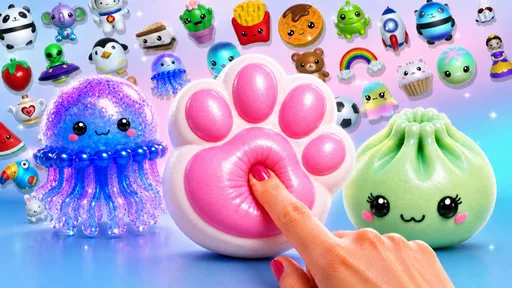

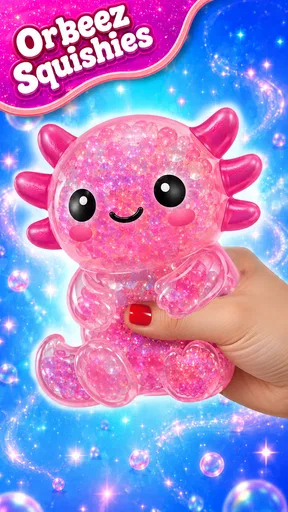




 Analysis by AppCompare
I tend to judge a creative game by how quickly it lets me understand what I can do, and whether the interaction still feels comfortable after the novelty wears off. Squishy Magic: 3D Toy Coloring is a light, hands-on activity built around decorating soft-looking 3D toys and then playing with them. It is an educational game from Dramaton, though its appeal is less about lessons and more about experimenting with color, shape, and touch-like movement.
That distinction matters when choosing it for a child, a quick break, or a calming activity. I would not treat it as a structured art course or a substitute for a physical fidget toy. I see it as a simple digital creative space: easy to approach, visually playful, and best enjoyed in short sessions when you want to make something without worrying about getting it right.
Finding your way around the toy gallery
The first impression is a gallery of colorful characters and objects to choose from, rather than a menu full of instructions. That gives the game an approachable feel: I can look at the available squishies and decide what catches my eye before I start decorating. The interface is friendly, but the experience also depends on small visual controls, so a child who is still learning to navigate touchscreens may benefit from an adult showing them how to begin.
As an educational game, it encourages open-ended choices rather than asking me to follow a lesson or reach a correct answer. I can try a color, inspect the result, and change direction. That freedom suits casual play, although anyone hoping for drawing guidance, a step-by-step craft activity, or clear learning goals may find the experience too unstructured. I would choose it for creative exploration, not for a formal teaching session.
Get Ready to Squish!
First things first, the app's interface is as friendly as a golden retriever. It's designed to be intuitive, so you don't need a degree in rocket science to navigate through it. When you open Squishy Magic: 3D Toy Coloring, you're greeted with a colorful gallery of squishies waiting to be customized. From cute animals to delicious-looking desserts, the variety is more than enough to keep your creativity flowing.
Personalize Your Squishies
The customization options are where the real magic happens. You can choose from a palette of vibrant colors and patterns to paint your squishies. Want a polka-dotted unicorn? Or perhaps a rainbow ice cream cone? The possibilities are endless. The app provides a range of brushes and effects which lets you unleash your inner artist. It's incredibly satisfying to see your creation come to life with just a few taps.
What I loved most is the real-time 3D effect. As you color, you can rotate the squishy around, giving you a full 360-degree view of your masterpiece. This interactive element makes the experience engaging and adds another layer of fun to the whole process.
Worth Reading Before You Choose

Switching to Android Auto Means Rethinking Your Driving Routine

Google Calendar Makes a Crowded Week Easier to Manage

Baby Panda World Brings Quick Play to Modern Phones, but Its Game Library Feels Busy

ESPN’s Live Game View Makes Following Close Games Easier

QuizzLand Review: A Good Fit for Short Trivia Breaks, Not Every Player

Basketball Stars: Multiplayer Is Fast, but Can It Recover When Matches Go Wrong?
Making color choices work on a small screen
The 3D view changes the way I approach coloring compared with a flat coloring book. I can turn a toy to inspect its sides, which makes it easier to notice whether a design feels balanced all the way around. A useful habit is to rotate the object before settling on a pattern, then check it again from another angle after applying color. That little pause helps avoid concentrating all the detail on the side I first saw.
Small-screen play does have a trade-off: precise placement can take patience, especially if I am trying to make a tidy repeating design. I find it more enjoyable to lean into broad color choices and playful combinations than to expect fine-line control. For a child, that can be a helpful way to keep the activity about experimenting rather than correcting every mark. For someone who wants detailed illustration tools, a dedicated drawing app is likely a better fit.
Satisfy Your Need to Squish
Once your squishy is colored to perfection, it's time for the best part – squishing! The app simulates the tactile sensation of squishing a real toy, and it's oddly satisfying. You can pinch, squeeze, and stretch your creation, and the responsive animation makes it feel as close to the real thing as possible. It’s like having a stress reliever right in your pocket.
The squishing sounds and animations are a delight, adding to the sensory experience. It's perfect for those moments when you need a quick break or a little bit of stress relief. Trust me, there's something incredibly soothing about it.
Different hands, different comfort levels
The mix of coloring and squishing asks for different kinds of touch. Coloring calls for controlled taps and swipes, while playing with the finished toy invites broader gestures. That variety can make the game easier to approach than an activity that depends on one precise repeated movement, but it may still be awkward for anyone who finds touch controls tiring or difficult to coordinate. I would not assume the simulated squeeze will work for every player simply because it looks tactile.
The sound and motion are part of the appeal, but they may also be too stimulating for someone who prefers quiet, still activities. A practical way to decide is to try a brief session together and see whether the animation feels calming or distracting. If the sensory effect is not comfortable, the coloring itself may still be the more enjoyable part; if the interaction is the main draw, a physical squishy offers a different kind of feedback that a screen cannot reproduce.
A good fit for brief, low-pressure play
I can picture opening it during a short wait: a child chooses a toy, tries a few colors, turns it around, and spends a moment playing with the finished design before it is time to move on. At home, it can also work as a shared activity, with one person suggesting a color theme and another choosing where to apply it. Those small prompts add structure without turning the game into a lesson or making the result feel like a test.
It is less suited to situations where a player needs a quiet screen-free break, a focused drawing tool, or a game with clear goals and progression. The main reward is the act of making and interacting with a squishy, so players who need challenges, detailed instructions, or a strong sense of advancement may lose interest. I would also be cautious about presenting it as a guaranteed stress solution: it can be a pleasant distraction, but the effect depends on the person and the moment.
How it compares with coloring books and fidget apps
Against a paper coloring book, the strongest difference is the ability to turn the toy and see a design on a rounded object rather than a flat page. That makes color placement feel more playful, though it also makes precise work less straightforward. Compared with a basic fidget app, the creative stage gives me something to make before I start interacting with the object. If I only want a quick repetitive animation, that extra step may feel unnecessary; if I enjoy customizing things, it gives the session a more personal purpose.
The game is free to start, and its Everyone age rating makes it broadly approachable, but its optional in-app purchases mean families should check the purchase settings on the device before handing it to a child. Items are listed at prices ranging from $0.99 to $23.99 each. I would treat purchases as optional rather than necessary to understand the central appeal, and set expectations in advance if a child is likely to ask for more content while browsing.
Who is likely to enjoy it—and who may not
The game is most appealing to people who like cute objects, casual color experimentation, and touch interactions without pressure to produce polished art. It can suit a parent and child sharing a simple creative activity, or an adult looking for a short, playful diversion. Its broad audience is reflected in its 4.7 average from around 126,000 ratings, while over 10 million installs suggest that this kind of low-commitment play has reached a large audience. Those numbers do not tell me whether it will suit a particular player, so I would still judge it by their comfort with touch-based games and animated effects.
I would steer a player toward a drawing app if they want layers, fine control, or a more deliberate art workflow, and toward a physical toy if the goal is real pressure and tactile feedback. Someone who dislikes bright, cute visuals or prefers clear objectives may also be happier elsewhere. The current version is 6.90, and the game requires Android 7.0 or later, which is useful to check before installing it on an older device.
Why You'll Love It
If you’re wondering why you should give this app a shot, here are a few reasons. Firstly, it's a fantastic way to unwind and release stress. Secondly, it sparks creativity and brings out the artist in you. Plus, there are no rules or restrictions – you are free to create whatever you fancy, making it a playground for your imagination.
Not to mention, it’s a great app for all ages. Whether you're a kid with a penchant for art or an adult looking for a fun way to de-stress, Squishy Magic: 3D Toy Coloring caters to everyone. The engaging interface and endless customization options ensure that boredom is never on the cards.
My inclusive verdict
What I appreciate most is that the game offers more than one way to take part: someone can focus on choosing colors, someone else can enjoy turning the model, and another player may prefer the squishing interaction. That flexibility is valuable, but it is not the same as making every control comfortable for every person. Touch precision, visual busyness, and sound sensitivity can all shape whether a session feels easy or tiring.
For a more comfortable first try, I would keep the goal small: pick one toy, choose a simple color idea, and see how the coloring and animation feel before making a longer activity of it. If the player enjoys that, they can explore more; if not, there is no need to push through. The game’s light, open-ended nature is its strength, but it also means it cannot replace guided activities or tools designed around particular access needs.
Final Thoughts
Overall, Squishy Magic: 3D Toy Coloring is a delightful escape into a world of creativity and relaxation. It offers a unique blend of art and play, wrapped up in a user-friendly package. Whether you're crafting the perfect squishy or simply enjoying the satisfying animations, it’s a joyful experience from start to finish.
So, if you're looking for an app that combines the joys of art with the relaxation of a stress ball, this might just be your new favorite pastime. Happy squishing!
Pros
- Engaging 3D toy designs enhance creativity.
- Realistic textures make coloring satisfying.
- User-friendly interface suitable for all ages.
- Regular updates add new toys and features.
- Offline mode available for uninterrupted play.
Cons
- Limited color options in the free version.
- In-app purchases can be frequent and pricey.
- Ads can be intrusive during gameplay.
- Requires substantial storage space on devices.
- Some users report occasional app crashes.
FAQs for Squishy Magic: ASMR Toy Maker
What is Squishy Magic: 3D Toy Coloring about?
Squishy Magic: 3D Toy Coloring is an engaging app that allows users to design and color virtual 3D squishy toys. With a wide variety of shapes and textures, users can unleash their creativity by customizing each squishy with unique colors and patterns. The app provides a relaxing and fun experience for both kids and adults.
Is Squishy Magic suitable for children?
Yes, Squishy Magic is designed to be suitable for children. The app features an intuitive interface that is easy for kids to navigate. Additionally, it promotes creativity and fine motor skills as children design and color their squishy toys. Parental guidance is always recommended to ensure a safe and enjoyable experience.
Do I need an internet connection to use Squishy Magic?
Squishy Magic can be used offline, which makes it convenient for users who want to play without an internet connection. However, some features may require internet access, such as downloading new shapes or accessing updates. It's best to have occasional connectivity to fully enjoy all the app's features.
Are there in-app purchases in Squishy Magic?
Yes, Squishy Magic offers in-app purchases. These purchases typically include additional shapes, colors, and textures to enhance the creative experience. While the basic features are free, these optional purchases can expand the variety and customization options available to users. Always check settings to manage purchases effectively, especially for children.
Which devices support Squishy Magic: 3D Toy Coloring?
Squishy Magic: 3D Toy Coloring is available for both Android and iOS devices. The app is optimized for a wide range of smartphones and tablets, ensuring smooth performance and vibrant graphics. It's advisable to have the latest version of the operating system installed for the best experience.


